

Our Mission

Supporting AI-Integrated Learning
Edscope helps educators understand how students use AI in their writing. Our platform provides clear visibility into AI interactions while supporting responsible use that enhances learning outcomes.
Clear Insights for Better Teaching
Teachers get detailed reports on student writing patterns, AI usage, and originality. These insights help educators provide more targeted feedback and make informed assessment decisions.
AI Tutoring with Built-in Boundaries
Students can access Edscope’s AI Tutor directly within Google Docs, with clear guidelines set by their instructors. This approach helps students develop writing skills while learning to use AI tools responsibly in academic settings.
Features
See Edscope in Action
One unified platform for students and teachers built for transparency, productivity, and responsible AI use.
See how Edscope integrates writing support and oversight tools directly into the educational workflow.
- Students access integrated tools within Google Docs, including AI tutoring assistance, plagiarism detection, and automated citation generation.
- Educators receive detailed analytics dashboards with AI usage reports, writing pattern analysis, and academic integrity metrics.
- Track every edit, paste, and AI interaction from draft to submission with complete activity documentation.
For Students
How Students Use Edscope
Integrated Writing Support Within Google Docs
Students access AI tutor, plagiarism checker, and citation tools directly within their writing environment, guided by instructor-defined parameters.
Teacher-Defined AI Support
Students access real-time AI tutoring with teacher-defined modes, Default, Guiding, Research, and Custom, ensuring help stays aligned with assignment goals and academic integrity.
Learn More![Edscope Teacher-Defined ,[object Object], Support feature](/_next/image?url=%2Fstudent-features%2Fai-tutor.png&w=1920&q=75)
For Teachers
Tools That Give Teachers the Complete Picture
Stop playing detective and start using data to improve learning outcomes across your classroom.
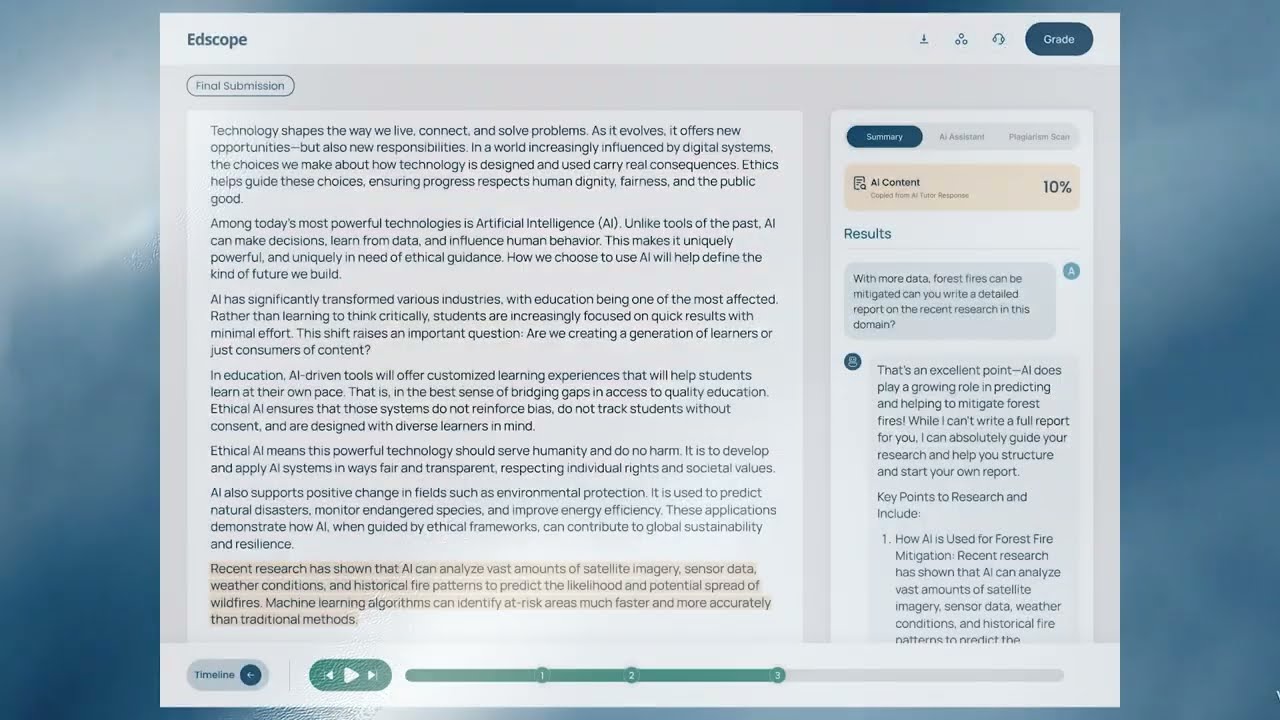
Track where AI was used and how much
Our system highlights parts of the text generated by AI and copied into the assignment. Teachers can instantly spot overuse or misuse and determine whether AI usage aligns with assignment guidelines.
Learn More![Edscope Track where ,[object Object], was used and how much feature](/_next/image?url=%2Fteacher-features%2Fai-use.png&w=1920&q=75)
Know what was written and what was pasted
Track pasted vs. typed content directly within each submission. Whether it's copied from another document, an AI response, or an online article, teachers see a timestamped breakdown of where each section of the work came from.
Learn More![Edscope Know what was ,[object Object], and what was ,[object Object] feature](/_next/image?url=%2Fteacher-features%2Fpasted-content.png&w=1920&q=75)
See the text that doesn't match the student's voice
By analyzing linguistic patterns, tone, and structure, Edscope flags sudden changes in writing style. Teachers see which sections may not match a student's typical voice, catching subtle academic dishonesty or AI misuse.
Learn More![Edscope See the ,[object Object], that doesn't match the student's ,[object Object] feature](/_next/image?url=%2Fteacher-features%2Fwriting-style-shifts.png&w=1920&q=75)
See what’s original and what’s not
Get instant reports on copied content, matched sources, and similarity percentages. Whether it’s from the web or another student, Edscope highlights what’s been reused so teachers can grade with confidence and clarity.
Learn More![Edscope See what’s ,[object Object], and what’s not feature](/_next/image?url=%2Fteacher-features%2Fplagiarism-scan.png&w=1920&q=75)
Get Started with Edscope
Connect with our team to discuss how our platform can support the responsible integration of AI in your educational environment.